Jul 27, 2026 · 12 min read
Chasing Centre Seats: Building a 70mm IMAX Seat Watcher for The Odyssey
Every 70mm IMAX showtime for Nolan's The Odyssey was sold out at both theatres near me. But seats get released constantly, so I captured Cineplex's own network traffic, turned a good seat into a scoring function, and built a read-only watcher that pings me when one opens up.
- Projects
- Python
- Automation
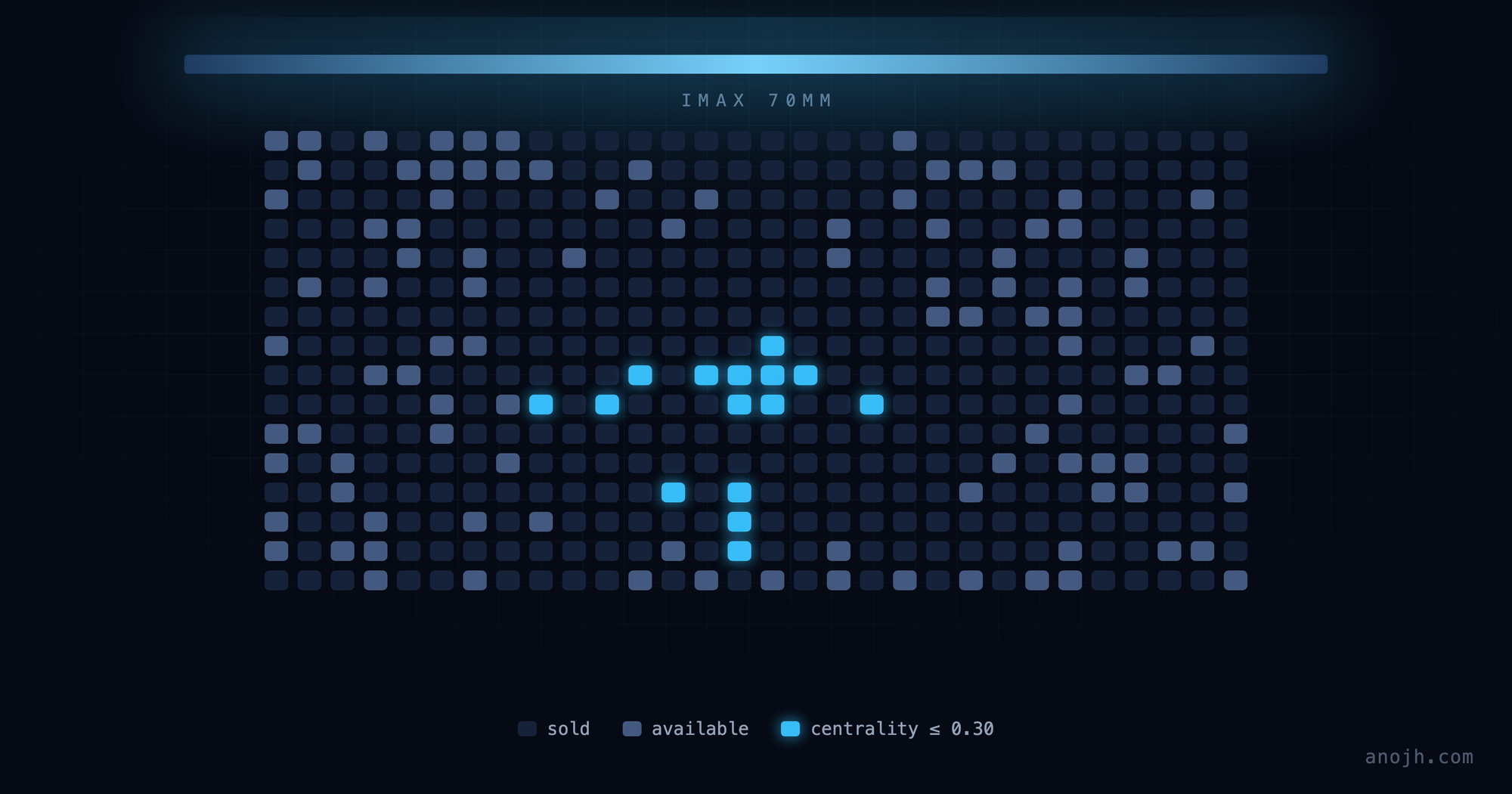
Christopher Nolan shot The Odyssey for IMAX 70mm, and if you're going to see a film made for that format, you see it in that format. There are exactly two theatres near me running it that way. Every showtime worth attending was sold out.
Sold out, though, is not a permanent condition. Holds expire. Plans change. Cards get declined. Seats trickle back into the pool constantly. The problem is that they trickle back at 11:40 on a Tuesday night, and by the time you next refresh the page, someone else has them. And not all returned seats are worth having. On a screen that size, the difference between the centre of the auditorium and the front-left corner isn't a preference, it's whether the format was worth paying for.
So I wanted a very specific question answered, continuously: has a good seat opened up? Not "are there tickets," which the site already answers. Has a seat near the centre of the room become available in the last two minutes.
Credit where it's due: the idea wasn't mine. My brother-in-law Dennis and I are both movie buffs, and this started the way these things usually do, with the two of us talking about The Odyssey and how it had to be 70mm or not at all, until he said someone should just watch the seat map for you. He came up with it. I turned it into something that runs.
Here's how I built it, including the parts where I decided what not to do.
Checking what already existed
The first step of any project like this is confirming you need to build anything. There's a healthy ecosystem of ticket-alert tools out there, and I went looking. What I found all answered the question I wasn't asking: they watch for availability in general. Any seat, any showtime, tell me when a sold-out screening isn't sold out anymore.
None of them knew where a seat physically sits in the room. That turns out to be the entire problem. For a sold-out 70mm run, "a seat is available" is nearly useless information; the front row is almost always available. I needed something that understood auditorium geometry, and that meant building it.
Capturing the site's own traffic
Cineplex's seat picker is a live, interactive map of the auditorium. That map has to come from somewhere, and it isn't baked into the HTML. The browser fetches it. So rather than scraping a rendered page, which is fragile and rude to the server, the better move is to find the data the page is already asking for.
The tool for this is right there in your browser. Open the seat-selection screen, open DevTools, go to the Network tab, and record. Then export the whole session as a HAR file, an HTTP Archive: a JSON record of every request the page made, with headers, timings and response bodies. It's a complete, replayable transcript of a browsing session, and it's how you understand a site's data flow without guessing.
Two requests mattered:
GET  apis.cineplex.com/prod/cpx/theatrical/api/v1/showtimes
       ?language=en&locationId=1405&date=7%2F24%2F2026&experiences=imax

GET  apis.cineplex.com/prod/ticketing/api/v1
       /theatre/{theatreId}/showtime/{showtimeId}/seat-availability
     …/seat-layout
The first lists showtimes at a theatre, filtered by experience, and experiences=imax was a gift, because it meant I never had to guess which screenings were the ones I cared about. The second pair is the interesting one: seat-layout returns the auditorium's geometry, every seat's row and physical column position, and seat-availability returns what's currently free.
That split matters more than it sounds. Layout is static and tells you the shape of the room. Availability is volatile and tells you almost nothing on its own. A list of seat IDs is meaningless until you know where those seats are. Joining the two is what makes "is there a good seat" answerable.
Both endpoints sit behind an Azure API Management gateway and expect a subscription key header:
ocp-apim-subscription-key: ••••••••••••••••••••••••••••••••That key is not a secret in any meaningful sense. It's shipped to every browser that loads the site, and you can read yours out of DevTools in about fifteen seconds. But it is Cineplex's credential rather than mine, which becomes important later when I talk about publishing the code.
Parsing an API that has no documentation
Here's the part I'd do the same way again on any undocumented endpoint.
My first instinct was to write a parser against the exact JSON shape I'd captured. Walk to response.rows[].seats[].status, done. That works right up until the response changes, at which point the tool doesn't fail loudly, it silently reports zero available seats forever, and you don't find out until the film has already sold out.
So instead of parsing by path, the parser searches by shape. It walks the response tree and asks of every object: does this look like a seat?
def looks_like_seat(d):
    if not isinstance(d, dict):
        return False
    keys = {k.lower() for k in d.keys()}
    has_row = any("row" in k for k in keys)
    has_num = any(k in keys for k in ("seatnumber", "number", "column",
                                      "columnindex", "id", "name"))
    return has_row and has_num
Anything with a row-ish key and a number-ish key is a candidate. The parser then tries three different structural interpretations of the payload: rows containing child seat lists, flat lists of self-contained seat objects, and bare lists of seat-name strings under availability-ish keys. It merges whatever it finds, letting a definite answer override an unknown one.
It's more code than hardcoding the path. It also survives Cineplex renaming a field, reordering the tree, or serving a different shape to a different theatre. That last one is not hypothetical: the two theatres I was watching did not return identical structures. And when it genuinely can't recognise a payload, it prints the response keys and a preview instead of pretending everything is fine:
def describe_payload(payload, name):
    """One-line diagnostic of an unrecognized response."""
Loud failure on an endpoint nobody promised you is worth more than clever parsing.
Defining "a good seat" as arithmetic
This was the genuinely interesting design problem, because "good seat" is a feeling and a filter needs a number.
What I settled on is a centrality score from 0 (dead centre of the room) to 1 (worst corner), combining how far a seat is from the horizontal centre and how far it is from the ideal row:
col_dev = abs(col - centre) / (width / 2)
row_dev = abs(row_index[s["row"]] - ideal_row) / max(n_rows / 2, 1)
s["score"] = round(0.6 * col_dev + 0.4 * min(row_dev, 1.0), 3)
Three decisions are buried in those three lines.
Horizontal is weighted heavier than vertical (0.6 / 0.4). Sitting a few rows off-centre costs you far less than sitting the same distance off-axis. On a screen where the image fills your peripheral vision, being off to one side is the thing that ruins it.
The ideal row is deliberately not the middle. It's biased 15% toward the back:
ideal_row = (n_rows - 1) * (0.5 + CENTER_ROW_BIAS / 2)The geometric centre of an IMAX auditorium is closer to the screen than the seat you actually want. Nudging the target back a bit matches where people who care about this format tell you to sit.
Horizontal centre is measured across the whole auditorium, not per row. Rows have different lengths, aisles, and offsets, so seat 5 in a short back row is not in the same place as seat 5 in a long middle row. Scoring against the full column span of the room means every seat is judged against the physical centre of the space rather than the centre of its own row.
With a score in hand, the filter becomes trivial. CENTRALITY_THRESHOLD = 0.30 is roughly the middle third of the room. There's a MIN_ADJACENT setting for when you need seats together rather than one good single, which was my case, since I needed two.
One more flag, which I want to call out deliberately:
INCLUDE_ACCESSIBLE_SEATS = False   # count Wheelchair/Companion seats as bookable
                                   # targets for alerts/best-seat ranking
Wheelchair and companion positions are frequently dead centre, which means a naive centrality filter points straight at them. They're excluded from alerts by default. An automated tool that races a human to the accessible seating is not a tool I want to have written.
Alerting without becoming noise
A monitor that pings you every two minutes is a monitor you mute, and a muted monitor is worse than none. The alerting logic exists almost entirely to avoid that.
State lives in a small JSON file recording which centre seats you've already been told about. You get pinged when a good seat is newly available, not on every poll where it remains available. If a seat gets taken and later released again, that counts as new and you're pinged again, because it is genuinely actionable again.
Alerts go out over whichever channels you enable: a native desktop notification (macOS via osascript), email over SMTP, or a phone push through ntfy.sh, which is free and needs no account. Each alert names the seats and includes a direct link to that showtime's seat picker, because the entire point is to shorten the gap between "a seat opened" and "I am holding that seat."
Most of the time, running it looks like nothing happening at all, which is exactly right. A monitor you notice is a monitor you'll end up muting. The default mode is a plain terminal log, and the only interesting line in it is the one that isn't routine:
[18:29:37] refreshed 106 showtime(s)
  *** ALERT *** Cineplex Cinemas Langley & IMAX — Sun Jul 26, 7:00 PM: centre seats available: H17. Book: https://www.cineplex.com/en/ticketing/preview?theatreId=1405&showtimeId=534846
[18:33:03] refreshed 106 showtime(s)
[18:36:32] refreshed 106 showtime(s)
[18:40:02] refreshed 106 showtime(s)
[18:43:30] refreshed 106 showtime(s)
[18:46:56] refreshed 106 showtime(s)
[18:50:22] refreshed 106 showtime(s)
[18:53:46] refreshed 106 showtime(s)
[18:57:12] refreshed 106 showtime(s)
[19:00:36] refreshed 106 showtime(s)
[19:04:05] refreshed 105 showtime(s)
One seat, H17 in row H, dead centre, surfaced once and then thirty-five minutes of silence. That ratio is the design working. The duplicate-alert guard is why H17 appears exactly once instead of on all eleven of those passes.
Two details in that log worth reading. The cycles land about three and a half minutes apart rather than the 120 seconds I configured, because the interval is a sleep between passes and a full pass is 106 sequential requests. The real-world cadence is gentler than the setting implies. And the count drops from 106 to 105 on the last line: a showtime started and fell out of the window. Nothing to handle, it just stops being watched.
There's also a --dashboard mode that serves a live seat map on localhost:8408: the whole auditorium rendered in the browser, updating on an interval, with the good seats highlighted. That started as a debugging aid for the parser and turned into the thing I actually watched.
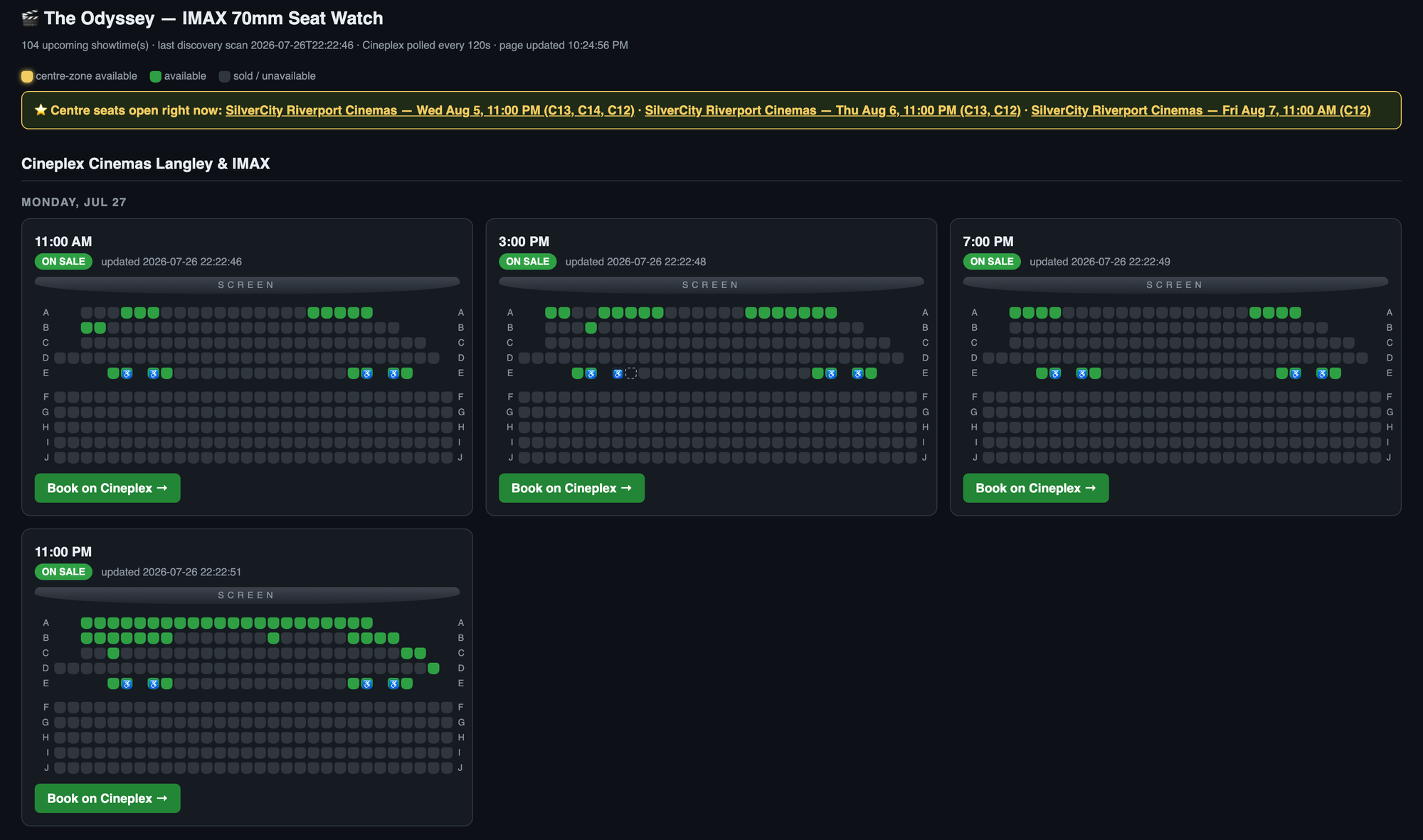
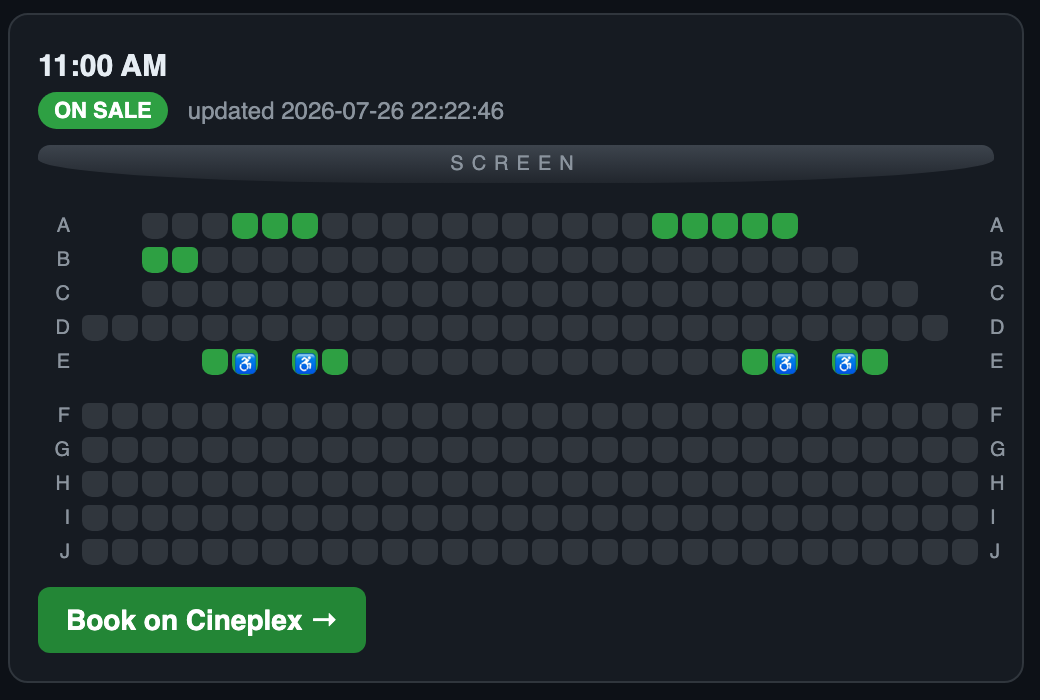
Each card is one showtime, rendered from the seat-layout geometry with seat-availability painted on top. Sold seats are dark, available seats green, and anything inside the centre zone is highlighted. Walkways and section gaps come through because the layout endpoint gives real grid coordinates rather than a flat list, which is also what makes the centrality maths trustworthy.
Run it however suits you: a single pass from cron every five minutes, or --loop with a 120-second interval.
*/5 * * * * /usr/bin/python3 /path/to/odyssey_seat_alert.py >> /tmp/odyssey_alert.log 2>&1The whole thing is one file of standard-library Python. No dependencies, no framework, no database. Just urllib, json, and a text file for state. For a tool with a lifespan measured in one film's theatrical run, that's the right amount of engineering.
The rules I set before writing any of it
Automating against someone else's site is the kind of thing where the constraints matter more than the code, so I decided mine up front.
Read-only, always. The tool never books, never holds, never touches a cart, never reserves anything. It reads availability and tells a human. Every purchase was me, on the website, like any other customer. And I did buy the tickets it found.
That line isn't arbitrary. It's the distinction between a monitor and a ticket bot, and it's the one the law actually cares about: the ticket-bot statutes on the books here target automated purchasing: circumventing purchase limits and queue controls to acquire inventory, typically to resell it. A read-only watcher that notifies a person who then buys one pair of tickets manually is a different thing. Cross the line into automated checkout and you're in a completely different conversation, both legally and ethically.
Polite by construction. Two theatres, one request each, no faster than every 60 seconds, and 120 by default. This is rounding error against Cineplex's normal traffic, and materially less load than leaving the seat-picker page open in a browser tab that polls on its own. If a tool like this ever needs aggressive polling to work, that's a signal to stop.
Personal use only. One person, two theatres, one film.
What the terms of use actually say
I read them properly before publishing this, and I'd encourage anyone building something similar to do the same rather than assuming.
Cineplex's Terms of Use contain no anti-scraping clause. No mention of bots, spiders, crawlers, data mining, harvesting, or rate limits. I checked the document rather than my memory of what terms of use usually say. What it does restrict is commercial use and redistribution:
You may not use the Website or Content for commercial purposes. You agree not to reproduce, duplicate, copy, sell, distribute, resell or exploit any portion of the Website and/or Content or use the Website and/or Content for any other purpose other than your personal, private, non-commercial purposes.
And it explicitly permits the opposite:
You may display, download and print the contents of this Website for non-commercial purposes which are personal or educational…
Personal, private, non-commercial is exactly what this is. I'm not republishing their data, reselling anything, or running a service.
There is one thing that cuts the other way, and leaving it out would be dishonest. cineplex.com/robots.txt ends with:
User-agent: *
Disallow: /
Everything outside a whitelist of search engines is disallowed. That isn't part of the contract, and robots.txt addresses crawlers indexing a site rather than a person's own client fetching a page they're entitled to view. But it is an explicit, machine-readable statement that the operator doesn't want automated clients, and pretending otherwise would be convenient rather than accurate. It's a real point on the other side of the ledger, and it's part of why the constraints above are what they are.
I'm not a lawyer and this isn't legal advice. It's the reasoning I applied to my own use, shown so you can judge it.
On open-sourcing it
I'm putting the code up, with one deliberate omission: the API subscription key doesn't ship with it.
The key is public in the sense that every browser on cineplex.com receives it. But reading it out of your own session and committing it to a public repository are different acts. The second one redistributes someone else's access credential and lets people hit their API without ever visiting the site. It's the only place this project comes near the one restriction in those terms with any teeth, the clause about not interfering with security-related features.
So the script reads it from the environment, and the setup instructions tell you how to get your own:
API_KEY = os.environ.get("CINEPLEX_API_KEY", "")Fifteen seconds in DevTools. If you're not willing to do that, you probably shouldn't be running the tool. The captured HAR file is gitignored for the same reason. HAR captures are full of things you didn't mean to publish, and treating them as artifacts to be committed is a good way to leak your own session tokens along with someone else's keys.
Building it with an AI coding agent
I built this with AI-assisted coding, and the useful thing to say about that isn't "AI wrote my code." It's where it actually helped. Any of the current coding agents will do this job; nothing here depends on which one you reach for.
It wasn't in the Python. Any competent developer writes this in an afternoon. The help was in the exploratory middle: staring at a few hundred kilobytes of undocumented JSON from a HAR capture and working out which of the nested structures represented seats, then turning "I want a good seat" into a scoring function, then hardening the parser against shapes I hadn't seen. That's a fast loop of hypothesis, test against real data, revise. Exactly the loop that's tedious alone and quick with a collaborator who'll read the whole payload without getting bored.
The judgment calls stayed mine: read-only, don't touch the accessible seats, don't ship the key, don't poll aggressively. Those aren't technical decisions and they're the ones that determine whether a tool like this is fine or not fine.
Did it work?
Yes. Two centre seats, for me and my partner, bought through the website like any other customer, for a film we'd otherwise have watched from the second row with our necks at an angle. We're seeing it in the next couple of weeks, in 70mm, from the middle of the room.
The broader point is that most "sold out" states are softer than they look, and the data proving it is usually sitting in a JSON endpoint your own browser is already calling. The interesting engineering isn't getting at that data. It's deciding what a good answer looks like, encoding it precisely, and then being disciplined about what you refuse to automate.
Cite this post
Anojh Thayaparan, “Chasing Centre Seats: Building a 70mm IMAX Seat Watcher for The Odyssey,” anojh.com, 2026. https://anojh.com/blog/imax-70mm-seat-watcher-the-odyssey
© 2026 Anojh Thayaparan. Licensed under CC BY 4.0. You may quote, translate, or build on this post, including citing it as a source in an AI-generated answer, as long as you credit Anojh Thayaparan and link back to the original. Training or fine-tuning a model on it is not licensed.