Jul 30, 2026 · 13 min read
The Import That Succeeded: Rebuilding Emby Playback History for Tracearr
Tracearr can't read Emby's Playback Reporting data directly, so the path runs through Jellystat, and every hop quietly dropped something. Five problems later: 980 plays with IPs, codecs, runtimes and positions stitched back in from sources the importer never looks at.
- Homelab
- Troubleshooting
- Python
I run Emby at home, and I wanted the thing Tautulli users take for granted: a real history of what has been watched, by whom, on what, and from where. Tracearr does exactly that, live monitoring plus analytics for Plex, Jellyfin and Emby, so the plan looked like an afternoon's work. Point it at the server, import the history, done.
A couple of hours later I had learned three things about the import path, none of them from an error message, and once I had fixed those, two more surfaced behind them. Every step reported success. The data arrived. It just arrived degraded, and Tracearr's stats pages are built to quietly exclude sessions that are missing the fields they depend on.
What follows is the whole chain: why there is a middleman at all, the two bugs that silently ate more than half the history, the Python script that rebuilt the missing fields by joining three sources that each held one piece of the answer, and then the second round of problems that fixing the first round made visible.
All sample data in this post, the records and the row counts alike, is illustrative rather than real. Titles are invented, user IDs are made up, and the IP addresses come from the ranges reserved for documentation.
Why the chain has a middleman
Emby records playback through the Playback Reporting plugin, an Emby fork of the Jellyfin original, which keeps its own SQLite table of every play: date, user, item, play method, client, device, play duration, pause duration, and the client's remote IP.
Tracearr can't import that directly. Its documented path for Emby history runs through Jellystat, a stats webapp written for Jellyfin that also works with Emby. So the real pipeline is three applications and four hops:
Emby Playback Reporting plugin   (SQLite, via the plugin API)
        │  Jellystat "Playback Reporting Plugin Sync" task
        ▼
jf_playback_reporting_plugin_data    ← raw copy, in Jellystat's Postgres
        │  ji_insert_playback_plugin_data_to_activity_table()
        ▼
jf_playback_activity                 ← what Jellystat's UI and backups read
        │  Jellystat backup JSON → Tracearr → Settings → Import → Jellystat
        ▼
Tracearr sessions → TimescaleDB continuous aggregates → stats pages
Four hops, three of which I ended up debugging. One piece of context worth having before any of it: Emby's item IDs are numeric where Jellyfin's are GUIDs, and both Jellystat and Tracearr were written Jellyfin-first. Everything here is a historical-migration problem. Once you're live, both tools capture every field natively.
Bug 1: 233 movies went in, zero came out
The first symptom was easy to see and hard to explain. Jellystat showed TV activity and no movie activity whatsoever, even though the plugin data plainly contained movies.
Counting rows at each stage located it precisely. First, what the plugin actually exported:
awk -F'\t' '{print $4}' PlaybackReportingBackup-*.tsv | sort | uniq -c
#  744 Episode
#  233 Movie
#    3 Audio      → 980 total
Then what survived into Jellystat:
-- The raw copy: everything is here
SELECT COUNT(*) FROM jf_playback_reporting_plugin_data;            -- 980

-- What the UI actually reads: less than half, and no movies at all
SELECT COUNT(*) FROM jf_playback_activity WHERE imported = true;   -- 490
So the sync into Jellystat was fine. The conversion from the raw plugin table into the activity table was where 490 of 980 rows survived.
That conversion is a stored procedure, ji_insert_playback_plugin_data_to_activity_table(), and it has two behaviours that compound into something much worse than either one alone.
It only converts plays whose item it can already see. The procedure joins each plugin row against Jellystat's synced library and skips anything it can't match, via WHERE i."Type" IS NOT NULL. I had started the plugin import while Jellystat's initial library sync was still running. The TV library had finished; the movie library had not. So zero of 233 movie plays converted, along with only 490 of the 744 episodes.
And it only ever runs once. The entire insert is guarded by WHERE NOT EXISTS (SELECT ... FROM jf_playback_activity WHERE imported = true). The moment a single imported row exists, re-running the sync task inserts nothing at all.
Those two together are the real bug. A partial conversion is recoverable. A partial conversion that can never be re-run is a permanent hole in your history. I could have re-run that sync task all afternoon, and did for a while, and it would have reported success and changed nothing each time.
The fix is to clear the partial state and call the procedure directly, now that the library sync has finished:
DELETE FROM jf_playback_activity WHERE imported = true;            -- DELETE 490
CALL ji_insert_playback_plugin_data_to_activity_table();
SELECT COUNT(*) FROM jf_playback_activity WHERE imported = true;   -- 951
490 → 951: 743 episodes, 205 movies, 3 audio. The remaining 29 plays reference items that have since been deleted from Emby, so there is nothing left in the library for them to match against. Hold that thought. They come back at the end.
That DELETE is safer than it looks. It only touches rows marked imported = true, which are exactly the rows the procedure recreates on the very next line. Natively tracked activity is untouched.
…and the Activity tab still showed episodes only
The stats pages now had movies. The Activity tab still didn't.
That tab doesn't read the table. It reads js_latest_playback_activity, a materialized view, and Jellystat refreshes that after its own insert paths, all of which I had just bypassed by calling the procedure over SQL. The view was faithfully serving its pre-fix snapshot.
REFRESH MATERIALIZED VIEW js_latest_playback_activity;
REFRESH MATERIALIZED VIEW js_library_stats_overview;
The generalisable version, and the reason this deserves its own heading: when you write to an application's database by hand, you inherit every side effect its own code paths would have handled for you. Cache invalidation is usually the one that bites.
Bug 2: the import that succeeded
951 rows of clean history in Jellystat. Backup exported, uploaded to Tracearr, import reported success. And then:
/stats/devices: completely blank/library/watch: the Movies and TV completion charts, blank- The map: blank
- IP addresses on individual sessions: blank, or literally
0.0.0.0
Nothing had failed. The sessions were there; I could scroll through them in the history. Three specific pages simply had nothing to say about them.
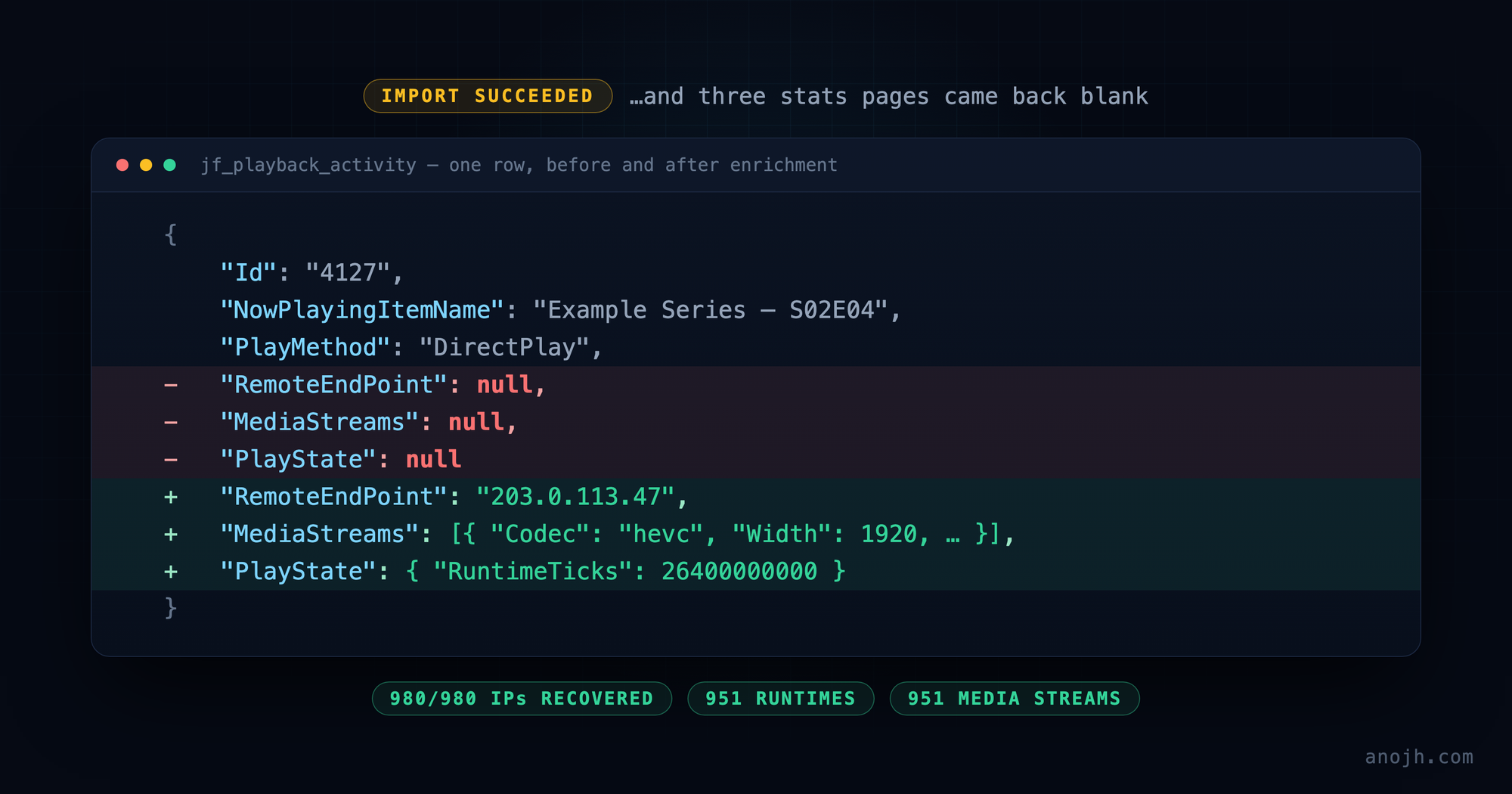
The cause is one design decision with three consequences. Jellystat's plugin-import procedure hardcodes NULL for every field the Playback Reporting plugin doesn't feed it: RemoteEndPoint, DeviceId, MediaStreams, TranscodingInfo, PlayState. Tracearr imported those NULLs faithfully. A converted row reaches it looking like this:
{
  "Id": "4127",
  "UserId": "b7c1e4f09a2d4c8e9f3a5b6c7d8e9f01",
  "NowPlayingItemId": "184629",
  "NowPlayingItemName": "Example Series — S02E04",
  "Client": "Example TV App",
  "PlayMethod": "DirectPlay",
  "PlaybackDuration": "2412",
  "RemoteEndPoint": null,
  "DeviceId": null,
  "MediaStreams": null,
  "TranscodingInfo": null,
  "PlayState": null
}
And each of those blank pages filters on exactly one of the nulls:
- The map, and per-session IPs. Tracearr wants a real IP, which it runs through GeoIP before filtering on
geo_lat/geo_lon IS NOT NULL. It gotRemoteEndPoint: null, and itsextractIpFromEndpointfallback turns that into0.0.0.0, which geolocates to nowhere. /stats/devices. Every query behind that page carriesAND source_video_codec IS NOT NULL, derived fromMediaStreams. It gotMediaStreams: null, so every imported session was excluded./library/watchcharts. Thedaily_content_engagementcontinuous aggregate filters onWHERE total_duration_ms > 0, derived fromPlayState.RuntimeTicks. It gotPlayState: null, which took those sessions out of the completion donuts, the hourly and monthly patterns, and the peak-time stats.
This is the part I would want someone else to take from the post. The import didn't fail, and it wasn't wrong to report success. Every row it was handed, it wrote. But a pipeline that drops columns rather than rows fails in a way no status message will ever surface. You find it by noticing that a page which ought to have data doesn't.
Three sources, one file
What made this fixable is that none of the missing data was actually lost. It was just never in the place the import chain looked for it.
| Missing field | Where it still existed |
|---|---|
Client IP: RemoteEndPoint | The Playback Reporting TSV export. Emby's plugin fork records RemoteAddress on every play; Jellystat's sync reads the file and simply never stores that column. |
Runtime: PlayState.RuntimeTicks | The Jellystat backup itself, in jf_library_items and jf_library_episodes (RunTimeTicks per item). Tracearr's importer doesn't read those tables. |
Codec, resolution, bitrate: MediaStreams | Also in the Jellystat backup, in jf_item_info, a complete MediaStreams array per item. Also ignored by the importer. |
So the work was a join: rebuild the activity rows from the raw plugin table, stitch each one back together from the three places its fields survived, and emit a backup file Tracearr would accept.
The timestamp problem
Matching an activity row to its TSV line needs three things to agree: user, item, and time. The first two are exact. The third is not. The TSV writes the media server's local time while Jellystat stores UTC.
Hardcoding an offset would work until it didn't, and if the data spans a daylight-saving transition then no single offset is correct for all of it. So the script derives the offsets from the data instead:
# Score every half-hour offset by how many rows it aligns, and keep the top
# two — enough for one timezone plus its DST sibling.
OFFSET_CANDIDATES = [h / 2 for h in range(-24, 29)]   # -12h .. +14h

def detect_offsets():
    hits = {}
    for r in plugin_rows:
        utc = datetime.strptime(r["DateCreated"][:19], "%Y-%m-%dT%H:%M:%S")
        for local, _ip in tsv_map.get((r["UserId"], r["ItemId"]), []):
            for oh in OFFSET_CANDIDATES:
                if abs((utc - (local + timedelta(hours=oh))).total_seconds()) <= 2:
                    hits[oh] = hits.get(oh, 0) + 1
    return sorted(hits, key=hits.get, reverse=True)[:2]
Two seconds of tolerance, because the two systems don't write their timestamps at quite the same moment. On my data this matched 980 of 980 plays to an IP address.
Reassembling the rows
With the offsets known, each row is rebuilt from the plugin data and then enriched from the library tables. Abridged to the part that matters:
for r in sorted(plugin_rows, key=lambda x: int(x["rowid"])):
    item_id = r["ItemId"]
    ep   = episodes.get(item_id)    # jf_library_episodes
    li   = items.get(item_id)       # jf_library_items
    info = item_info.get(item_id)   # jf_item_info

    # Runtime: the episodes table first, then items for movies and audio.
    src = ep or li
    ticks = int(src["RunTimeTicks"]) if src and src.get("RunTimeTicks") else None

    activity.append({
        "Id": r["rowid"],              # becomes Tracearr's external_session_id
        "UserId": r["UserId"],
        "NowPlayingItemId": item_id,
        "NowPlayingItemName": r.get("ItemName"),
        "SeriesName": ep.get("SeriesName") if ep else None,
        "PlaybackDuration": r.get("PlayDuration"),
        "ActivityDateInserted": r["DateCreated"],
        "PlayMethod": r.get("PlaybackMethod"),

        # The three fields Jellystat's own import leaves NULL:
        "RemoteEndPoint": find_ip(r["UserId"], item_id, utc_of(r)),
        "MediaStreams": info.get("MediaStreams") if info else None,
        "PlayState": {"RuntimeTicks": ticks} if ticks else None,

        "imported": True,
    })
Three details in there cost me time and are worth writing down:
- Tracearr validates uploads against a zod schema, and
jellystatPlaybackActivitySchemais a loose object, so unknown keys pass straight through. A misspelled key name fails silently rather than loudly. RuntimeTicksmust be a number. Jellystat stores it as a string, so passing it through unchanged fails validation.PlayMethodmust beDirectPlay,DirectStream, or aTranscode…string.
The re-import trap
One last obstacle, and it isn't about data at all. Tracearr's importer deduplicates by external session ID and skips rows it has already seen. Its "update existing" option patches stream details, but not IP, geo or runtime, which were precisely the fields I was trying to fix. A re-import over the degraded rows would have been a very confident no-op.
So the script emits a companion SQL file to clear them first:
BEGIN;
DELETE FROM sessions
WHERE state = 'stopped'
  AND external_session_id IN ( '4127', '4128', '4129', … );
COMMIT;
Scoped deliberately narrowly: state = 'stopped', and external IDs drawn from the plugin's own row IDs. It can only ever touch previously imported history, never a live-tracked session.
Running it
# 1. clear the degraded import
docker exec -i tracearr-db psql -U tracearr -d tracearr < tracearr_delete_imported.sql

# 2. Tracearr → Settings → Import → Jellystat → upload the enriched JSON
#    Leave "Enrich with media metadata" ON: season and episode numbers,
#    years and posters are fetched from Emby at this step.

# 3. Tracearr rebuilds its TimescaleDB aggregates automatically afterwards.
Final state: 980 plays, made up of 744 episodes, 233 movies and 3 audio, with an IP on every one of them (973 publicly geolocatable; the other 7 are LAN addresses, which correctly don't resolve to anywhere), runtimes and MediaStreams on 951, and all three blank pages populated.
That 980 includes the 29 plays of since-deleted items that Jellystat could never convert. They carry a title and little else, but they count toward play totals and appear in history, which is more than they would ever have managed through the supported path.
Round two: what the fix uncovered
With the three blank pages populated I thought I was done. Two more problems were waiting, and one of them only became visible because of the fix.
Every user joined today, and nobody had any last activity
Emby doesn't expose an account-creation date at all, so Tracearr's user sync leaves joined_at NULL and the interface falls back to created_at, which is the date Tracearr synced the user, not the date they joined anything. last_activity_at has a separate problem: only the live poller ever writes it.
Both are perfectly derivable from imported history, and Tracearr's Tautulli importer does exactly that. The Jellystat importer doesn't, which is an upstream gap rather than anything I had done wrong.
This one needed no SQL at all, which after the preceding couple of hours felt almost insulting. Tracearr ships a maintenance job for precisely this case: Settings → Jobs → "User dates backfill" sets each user's joined date to their earliest session and their last activity to their most recent. Run it after the history import, or it has nothing to work from.
Worth generalising, since I'd just spent an afternoon doing the opposite: before writing SQL against an application's database, check whether it already ships a job for the thing you're about to do by hand.
Everything I had finished was marked "Abandoned"
The history page put an Abandoned (<20%) badge and a flat 0% on sessions I knew perfectly well I had watched to the end.
The oddity that located it: the engagement chart on the stats page counted those same plays correctly. Only the per-session history rows were wrong. When two views of one dataset disagree, they aren't reading the same field.
They weren't. The history table computes progress from playback position, as progress_ms / total_duration_ms, while the engagement aggregates fall back to summed watch time. The Playback Reporting plugin never records position, so every imported session arrived with PositionTicks NULL, which reads as 0%, which is under 20%, which is "Abandoned".
The part I enjoyed: my own round-one fix is what made this visible. With no runtime on a session Tracearr hides the badge entirely. It can't express a percentage of an unknown total, so the session sits in an "unknown" tier. Adding runtimes handed it a denominator, so the badge started rendering. At 0%. The bug had been there the whole time; enriching the data is what gave it somewhere to appear.
So the script fills in two more fields:
    # The plugin records how long you played, never where you stopped, so
    # position is estimated from play duration and capped at the runtime.
    position = min(int(r["PlayDuration"]) * 10_000_000, ticks) if ticks else None

    "PlayState": {
        "RuntimeTicks": ticks,
        "PositionTicks": position,
        # 85% is Tracearr's own "watched" threshold.
        "Completed": bool(ticks and position and position >= ticks * 0.85),
    },
Then delete and re-import, exactly as before.
Two honest caveats on that. Position is an estimate: it assumes linear playback, so it reads slightly high for anyone who seeks around a lot. And a title watched across several sittings still produces one history row per sitting, each showing only that sitting's share of the runtime rather than the combined total. That isn't an import artifact, because Tracearr renders live sessions the same way. The engagement aggregates, reading cumulative watch time, still credit the combined total across sittings, so nothing is lost statistically. It's purely a per-row display characteristic.
If you're about to do this, do it in this order
- Export the Playback Reporting TSV and keep it. It is the only place the client IPs survive the chain. Export it before you discover you need it.
- Deploy Jellystat and let the full library sync finish. All of it, movies included, before you import any plugin data. This is the whole ballgame. Nearly everything else in this post is a consequence of not doing it.
- Then run the Playback Reporting plugin sync. If you've already run it out of order, the
DELETE-and-CALLabove puts it right, followed byREFRESH MATERIALIZED VIEWon Jellystat's two views. - Generate the enriched backup with IPs, runtimes, positions and MediaStreams. Skipping positions is what leaves finished shows badged as abandoned.
- Delete the previously imported sessions in Tracearr, then import the enriched JSON. Its dedup will otherwise skip every row you are trying to fix.
- Run Settings → Jobs → "User dates backfill", after the import rather than before.
- Run Tracearr's own library sync before expecting
/library/watchto show anything. Those charts join sessions againstlibrary_items, which the import doesn't populate. - Check the filters before assuming a bug. Tracearr's device-compatibility page hides combinations with fewer than five sessions by default, and most stats exclude sessions shorter than two minutes. An almost-blank page is sometimes just an almost-empty filter.
Two things you can't get back, for completeness. Historical TranscodingInfo is genuinely gone, though it matters less than it sounds, because Tracearr derives direct-play-versus-transcode from the plugin's own PlayMethod string, so transcode stats still work. And MediaStreams enrichment reads each item's current file, which is exact for anything direct-played and an approximation for anything re-encoded since. That's a real caveat on my library, given that I have a Tdarr flow that re-encodes things.
What I'd take from it
Not one of these problems announced itself. The sync task reported success while inserting nothing. The import reported success while writing NULLs into the three columns the interesting pages depend on. The materialized view served a stale snapshot without complaint. In every case the software did exactly what it had been written to do, and the only signal available to me was a page emptier than it should have been.
For the first half of this, the useful habit was a counting habit. Every hop in the chain got the same three questions. How many rows went in, how many came out, and are they the same kind of rows? Each of those bugs showed up as an arithmetic mismatch long before I understood the mechanism behind it. 980, then 490, then 951, then 980 again. The numbers found the bugs; reading the source only explained them.
The second half didn't work that way at all. Every count was correct by then. What was wrong was a claim: a badge asserting I had abandoned something I had watched to the end, and a join date that was really a sync date. No amount of counting catches those, because nothing is missing. The arithmetic is fine and the conclusion drawn from it is not. Those needed a different question, and a less comfortable one: is what this page is telling me actually true?
And the one I keep thinking about is that the "Abandoned" badge was only ever visible because I had fixed something else first. Without runtimes there was no denominator, so Tracearr showed no badge at all, and I would have called the migration finished. Repairing one layer is what gave the next defect somewhere to render. Which is a good argument for looking again after you think you're done. Not at the thing you fixed, but at everything downstream of it that finally has enough data to be wrong.
References
- Tracearr: importing from Jellystat. The documented path, and the reason the Activity backup specifically is what you need.
- connorgallopo/Tracearr. The destination. Reading its queries is what explained the blank pages; the filters described above are all in the source.
- CyferShepard/Jellystat. The middleman. The stored procedure at the heart of Bug 1 lives in its migration
093_..._EpisodeID_Fix.js.
Cite this post
Anojh Thayaparan, “The Import That Succeeded: Rebuilding Emby Playback History for Tracearr,” anojh.com, 2026. https://anojh.com/blog/emby-jellystat-tracearr-playback-history-migration
© 2026 Anojh Thayaparan. Licensed under CC BY 4.0. You may quote, translate, or build on this post, including citing it as a source in an AI-generated answer, as long as you credit Anojh Thayaparan and link back to the original. Training or fine-tuning a model on it is not licensed.