Jul 29, 2026 · 5 min read
One Millimetre of Plastic: Fixing FR2865 on the Creality K2 Plus
Every print that pulled from more than one CFS spool failed with FR2865, usually after the part was already finished. Nothing was jammed. The filament cutter was leaving a whisker of plastic behind, and the fix was a 1 mm spacer the printer made for itself.
- 3D Printing
- Troubleshooting
- Homelab
I bought a Creality K2 Plus in January. Single-material prints have been excellent from the first day. But the moment a print pulled from more than one spool in the CFS, a two-colour part or a different material for supports, it would fail with FR2865.
Not always at the same point, and very often after the print itself had already finished. The part would be sitting on the plate, complete and perfectly fine, and the printer would throw an error while trying to put the filament away.
The cause turned out to be about a millimetre of travel in a component I had never once thought about, and the fix was a spacer the printer printed for itself.
What FR2865 actually means
Creality's wording for the code is "feed issue, filament failed to exit extruder," which sounds like a jam and sends you looking for one. It isn't quite that. The error fires during the CFS retract phase: the extruder pulls the filament back, and then the filament break detector checks whether the extruder is clear. If it still sees filament there, you get FR2865.
That distinction matters, because it means the printer is not wrong. Something really is still in there. The only questions are what, and why the retract didn't take it with it.
Why it only showed up with multiple spools
This is the part that misled me for longest. Single-material prints were flawless, so I spent a good while suspecting the multi-spool machinery itself: the switching logic, the buffering, the tube routing.
But count the unload cycles. A single-material print unloads the filament once, at the very end. A two-colour print unloads and reloads at every single colour change, dozens or hundreds of times in one job. If an unload carries even a small chance of leaving the extruder unclear, a single-material print gets one roll of the dice and a multi-material print gets hundreds of them.
It was never a multi-spool bug. It was a per-unload bug, and multi-spool printing simply repeated it often enough to make it look like a feature of the CFS.
Working through the usual suspects
The documented path for FR2865 is all about obstruction: inspect the extruder for broken filament debris, clear any jam, shorten the PTFE tubes. That last one is Creality's own advice for repeated feed and unload failures, since the longer tubes shipped with some units measurably raise the failure rate.
That is sensible advice for a mechanism that is meant to be clear and isn't. None of it fixed mine.
A failed fix is information too, so it's worth sitting with rather than moving straight past. When every remedy for "there is an obstruction in the path" fails, the thing to start doubting is not the remedies. It's the assumption that an obstruction is what you're dealing with.
A whisker of filament gave it away
What finally cracked it was unloading the filament by hand and actually looking at the end of the strand.
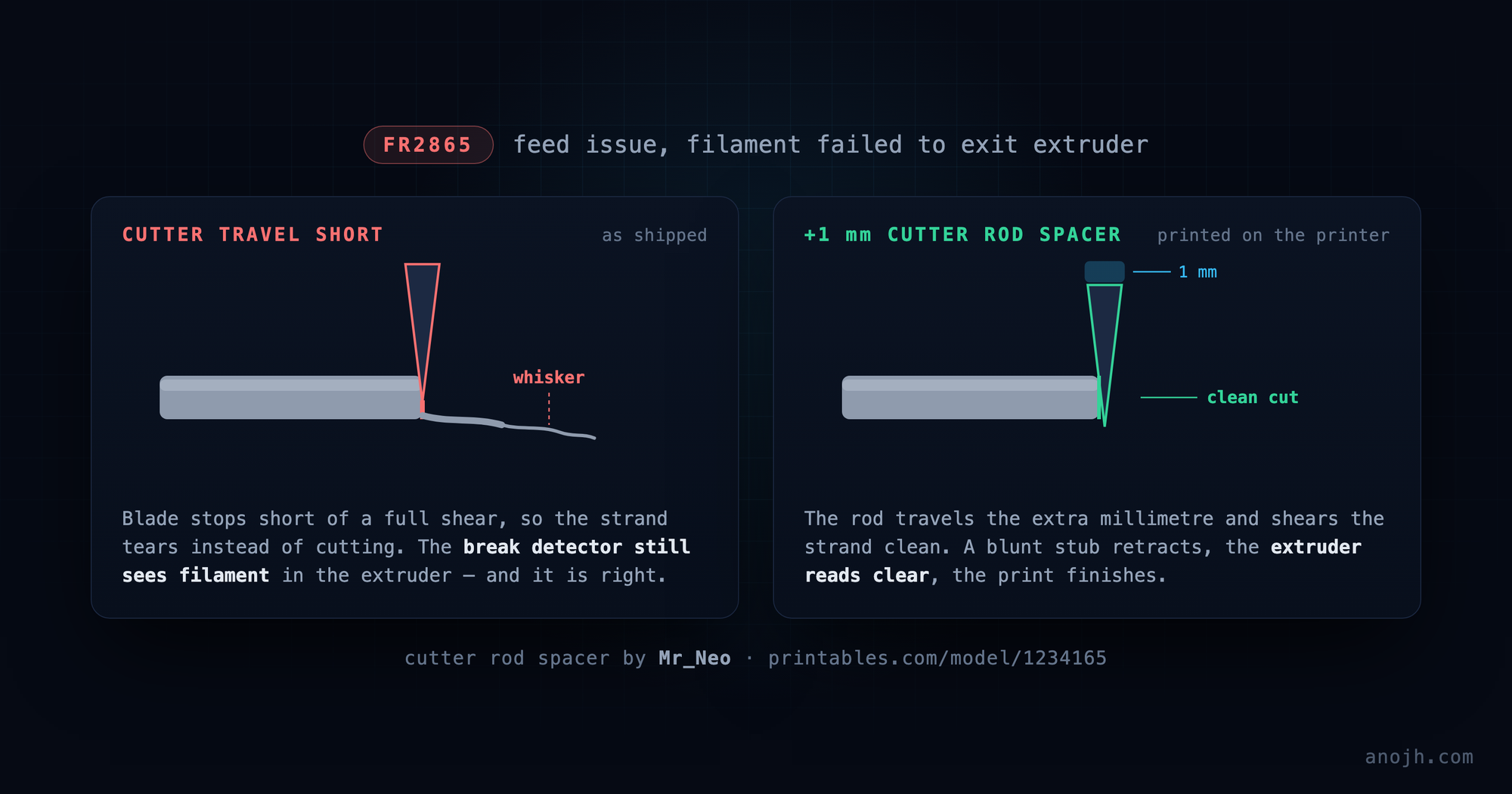
The tip wasn't the clean, flat, blunt face it should have been. It had a thin tail hanging off it, a whisker of plastic drawn out and still attached, right where the cutter was supposed to have severed the strand outright.
That whisker is the entire error. The cutter's job is to shear the filament cleanly so the retract pulls a blunt stub back and leaves nothing behind. A cut that doesn't go all the way through leaves a thin, stringy tip instead. A thin, stringy tip is precisely what the break detector reads as there is still filament in the extruder.
Nothing was jammed. Nothing was blocked. The printer had been reporting the truth the whole time: the extruder wasn't clear, because the cutter kept leaving something in it.
Why the cutter under-cuts
Once I knew to search for the cutter instead of the feed path, the answer turned out to be already documented. There is a thread on the Creality forum, titled very helpfully "FR2865 at End of Print – Root Cause Found (Filament Cutter Travel / Calibration)", describing exactly this failure: the cutter rod doesn't travel quite far enough, so the blade stops short of a complete shear and leaves the tip "stringy, blobby, or partially melted." A false jam, reported by a sensor that is doing its job correctly.
It's a mechanical tolerance problem. That's why it doesn't affect every machine, and why the amount of correction needed varies between the machines that do have it.
One millimetre of plastic
Someone had already solved it, and solved it properly. Mr_Neo's Creality K2 Plus Cutter Rod Spacer on Printables shims the cutter rod so the blade travels the extra distance it needs to finish the cut.
Because the underlying tolerance varies from machine to machine, so does the thickness required. On mine, 1 mm was the right one. It's a sub-gram part that prints in a couple of minutes, which I enjoyed more than I should have.
One thing worth knowing before you fit it, and this comes from that forum thread rather than from me: run a full calibration afterwards, cutter calibration included. At least one person there had the spacer work on the first print and then fail on the second, and recalibrating is what made it stick. Changing the geometry of the cutter and then not re-teaching the printer about it is asking for a fix that only half holds.
The result
Clean cuts, no more FR2865, and multi-material prints that run start to finish the way they should have been doing since January.
What I'd take from it
An error message can be perfectly accurate and still point you the wrong way. "Filament failed to exit extruder" was true every single time it appeared. It described what the sensor could see, not the mechanism that put it there, so every fix I tried addressed that symptom's usual cause instead of its actual one.
Look at the physical part. No amount of log reading was ever going to show me that whisker. I found it by unloading the filament by hand and inspecting the end of the strand: about thirty seconds of looking at an object, after a great deal longer spent not doing that.
When the failure rate is the clue, follow the rate. "Only breaks with multiple spools" felt like a multi-spool bug, and that framing cost me time. It was a per-unload bug all along, and working out why the frequency changed is what pointed me at the cutter.
Sources
Credit where it's due. I didn't diagnose the mechanism or design the fix. I recognised my own symptom in someone else's write-up:
- Mr_Neo, "Creality K2 Plus Cutter Rod Spacer" (Printables). The fix itself. The comments are worth reading before you print, since that's where people report which thickness their machine needed.
- Creality forum: "K2 Plus FR2865 at End of Print – Root Cause Found (Filament Cutter Travel / Calibration)". The cutter-travel diagnosis, and the recalibration step that makes the spacer hold.
- Creality Wiki: general troubleshooting for K2 Plus filament loading and unloading. The official first steps, including the PTFE tube length advice.
Cite this post
Anojh Thayaparan, “One Millimetre of Plastic: Fixing FR2865 on the Creality K2 Plus,” anojh.com, 2026. https://anojh.com/blog/creality-k2-plus-fr2865-cutter-rod-spacer
© 2026 Anojh Thayaparan. Licensed under CC BY 4.0. You may quote, translate, or build on this post, including citing it as a source in an AI-generated answer, as long as you credit Anojh Thayaparan and link back to the original. Training or fine-tuning a model on it is not licensed.